Migrating an ERP system is already a complex project. For a manufacturing company, the challenge goes beyond transferring business records. Production schedules, Bills of Materials (BoMs), work orders, inventory movements, lot traceability and financial records all need to remain connected and accurate throughout the transition.
A migration that overlooks these relationships can affect more than the ERP database. It can interrupt production planning, create inventory discrepancies, delay order completion and complicate financial reconciliation.
This is why manufacturing companies need a migration strategy built around their actual production workflows. ERP Consulting Group helps businesses assess their existing Odoo environment, identify migration risks and plan a controlled transition that accounts for manufacturing-specific requirements.
Our ERP manufacturing solution supports connected manufacturing operations, while our Odoo migration services help businesses plan and manage their migration requirements.
This guide explains the major challenges involved in Odoo migration for manufacturing companies, the data that needs special attention, and how to test the new environment before going live.
Why Manufacturing Migration Is a Different Problem
A trading company migrating Odoo must consider products, customers, vendors, inventory and financial records. A manufacturing company must manage these records along with the relationships that connect them to production.
For example, a Bill of Materials defines the components required to manufacture a product. That BoM connects to production orders, work orders, work centres, stock movements and, depending on the configuration, quality checks and accounting entries.
If a component reference is missing or a production order does not retain its correct status, the problem can affect the wider manufacturing workflow.
This creates several migration challenges:
- Production continuity: Open manufacturing orders must be handled without losing their operational status.
- Data relationships: BoMs, components, routings and work orders must remain correctly connected.
- Inventory accuracy: Stock quantities, locations and lot or serial number history must be validated.
- Costing accuracy: Work-in-progress (WIP) and inventory valuation need to reconcile.
- Workflow compatibility: Custom modules, integrations and manufacturing configurations must work in the target version.
A successful migration must therefore validate both the data and the processes that use it.
The Odoo Manufacturing Migration Workflow
A manufacturing migration should follow a controlled sequence. Data assessment and preparation come first, followed by migration execution, testing, reconciliation and go-live.
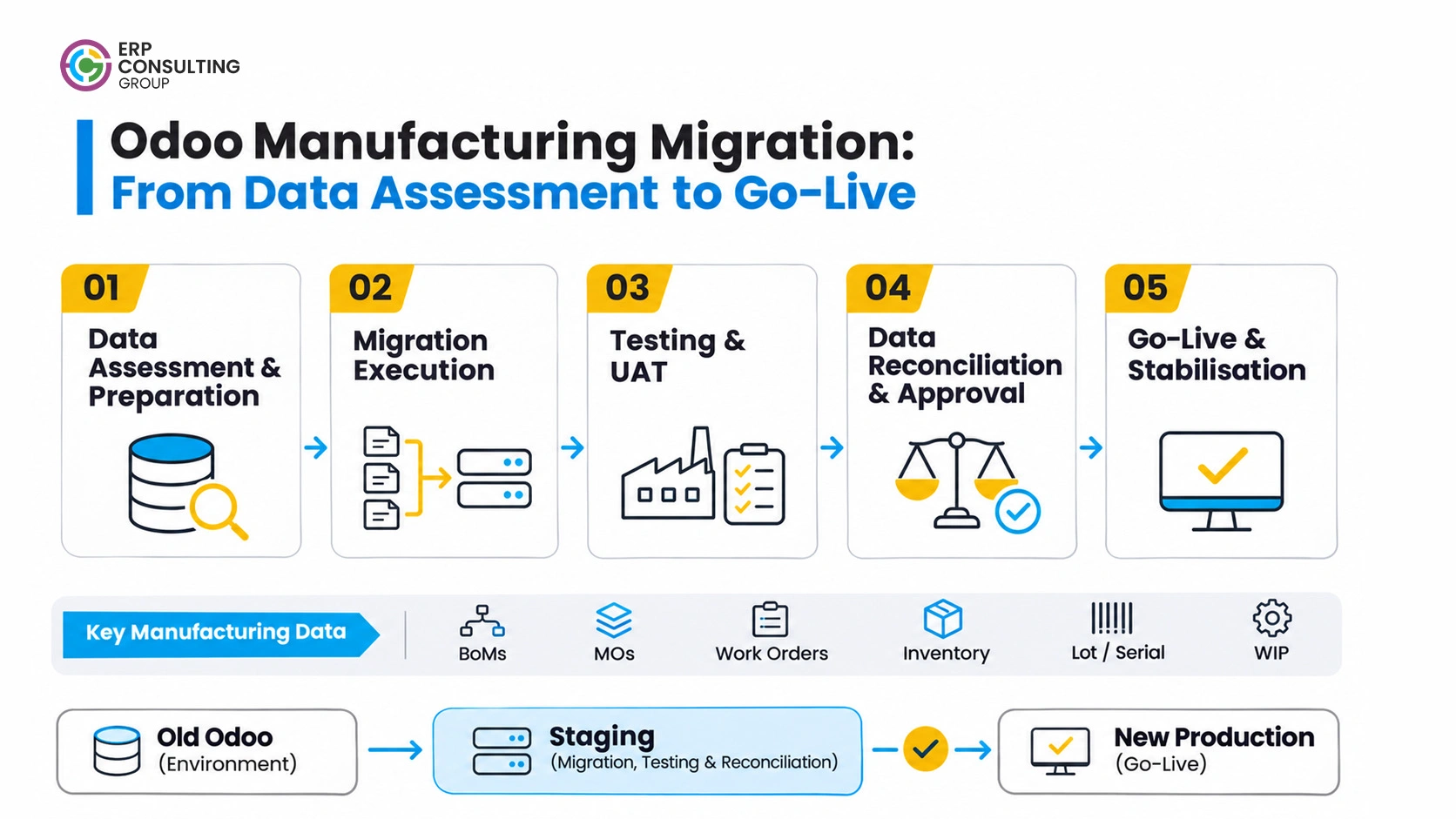
Placement: Immediately after this introduction and before the detailed migration stages.
The workflow should include five connected stages:
- Data Assessment and Preparation: Review the current Odoo environment, manufacturing records, custom modules and integrations.
- Migration Execution: Back up the database and migrate the agreed data into the target environment.
- Testing and User Acceptance: Test manufacturing workflows using realistic business data.
- Data Reconciliation and Approval: Compare records, inventory quantities, WIP and financial balances.
- Go-Live and Stabilisation: Complete the final cut-over and monitor operations in the new system.
Testing and reconciliation must happen before the new system becomes the live production environment.
For a broader understanding of the stages involved, read our guide to the Odoo migration process.
1. Data Assessment and Preparation
Start by reviewing the existing Odoo version, installed applications, custom modules, integrations and manufacturing configurations.
Identify the records that need to move, check their relationships and clean incomplete or duplicate data. Manufacturing-specific preparation should include BoMs, routings, work centres, open production orders, inventory records, lot and serial numbers, and WIP balances.
2. Migration Execution
Create a verified backup and perform the migration in a staging environment rather than directly in production.
The migration team transforms the database, adapts custom modules where required and transfers the agreed data into the target Odoo version. Errors and missing references should be recorded and resolved before moving to the next stage.
3. Testing and User Acceptance
Test the migrated manufacturing workflows using realistic product and production data.
Check whether BoMs generate the correct component requirements, work orders follow the expected sequence, material consumption is recorded correctly and finished goods update inventory as expected.
Production, inventory, finance and other relevant teams should participate in user acceptance testing (UAT).
4. Data Reconciliation and Approval
Compare the old and new systems. Validate record counts, inventory quantities, lot and serial number history, open production orders and financial balances.
Any discrepancies should be investigated and resolved before go-live approval.
5. Go-Live and Stabilisation
Schedule the final cut-over around a suitable production break. Complete the final data transfer, confirm user access and test critical workflows.
After go-live, monitor production, inventory, accounting and integrations closely. Keep migration support available while users begin working in the new environment.
What Changes Between Odoo Versions in Manufacturing?
Each major Odoo version can introduce changes to manufacturing features, data structures and workflows. The difference between your current version and target version determines how much assessment, customisation and testing may be required.
Manufacturing Areas That Need Review
- Work centres: Capacity planning, scheduling configurations and work centre settings should be reviewed. A configuration that worked in an older version may need adjustment in the target environment.
- Bills of Materials: BoM structures, versioning, by-products and component availability rules need to be checked for compatibility.
- Production orders: The relationship between manufacturing orders, work orders and stock movements must be validated, especially when orders are still in progress.
- Routings and operations: Review how routings and operations are configured in both versions. Changes to their structure or behaviour can affect production workflows.
- Quality module: If the migration involves a change in Odoo edition or quality configuration, assess how quality checks and production controls will be set up in the new environment.
The assessment should not assume that all existing configurations will transfer unchanged. Each manufacturing workflow should be reviewed against the target version before migration begins.
The Data Challenges Specific to Manufacturing
Manufacturing businesses maintain interconnected records that require more attention than a standard data transfer. Four areas deserve particular focus.
1. Bills of Materials
A Bill of Materials defines the components and quantities required to manufacture a product. Some products have multi-level BoMs, where one component is itself a manufactured subassembly.
For example, a finished product may require several subassemblies, each containing multiple components. If a component reference is missing or a unit of measure is mapped incorrectly, the affected BoM may not generate the expected production requirements.
Migration risks:
- Missing or archived component references
- Incorrect units of measure
- Incomplete multi-level BoM relationships
- Incorrect quantities or component configurations
- Differences in BoM behaviour between versions
What to validate before migration:
- Confirm that every referenced component exists and is active where required.
- Check units of measure and conversion rules.
- Review multi-level BoMs and subassembly relationships.
- Verify by-products and other relevant BoM configurations.
- Generate sample production orders using migrated BoMs.
The objective is to confirm that the new system can use the migrated BoMs to plan and execute production correctly.
To understand how Odoo connects BoMs with production orders and work orders, explore our guide to managing manufacturing operations with Odoo.
2. Lot and Serial Number Traceability
Manufacturers that track products or components using lots and serial numbers must preserve the relationship between each identifier, its product, stock location and movement history.
Moving the current stock quantity without validating historical movements can create incomplete traceability records. This becomes especially important when a business needs to investigate product quality issues, warranty claims or the movement of a particular batch.
Migration risks:
- Lot or serial numbers linked to incorrect products
- Missing historical stock movements
- Incorrect stock locations
- Incomplete traceability reports
- Differences between old and new inventory records
What to validate after migration:
- Confirm that lot and serial numbers are linked to the correct products.
- Check current quantities and stock locations.
- Compare historical movement records with the old system.
- Run traceability reports for selected products.
- Verify that new receipts, consumption and finished-goods movements record traceability correctly.
The goal is to preserve both current stock accuracy and the historical information needed to trace products.
3. Open Production Orders at Cut-Over
One of the most operationally sensitive decisions in a manufacturing migration is what to do with production orders that are still in progress when the new system goes live.
A partially completed order may already have consumed raw materials, completed some operations and generated work order records. Simply transferring the order without validating its status can create problems in the new environment.
There are three possible approaches, each with trade-offs:
Approach | How it works | Main consideration |
Complete open orders before cut-over | Finish existing production orders in the old system before switching | Requires sufficient time and a suitable production freeze |
Migrate open orders | Transfer in-progress orders and continue them in the new system | Requires detailed testing of order states, components, routings and work orders |
Close and recreate orders | Close existing orders and manually create replacement orders in the new system | Requires careful handling of consumed materials, costs and remaining quantities |
The right approach depends on production cycle length, the number of open orders, the complexity of work in progress and the target system's ability to preserve the required order information.
This decision should be made during migration planning, not on the day of cut-over.
4. Work-in-Progress (WIP) Valuation
Work in progress represents materials and production costs associated with items that have not yet become finished goods.
For example, a manufacturing order may have consumed raw materials and completed some operations, but the finished product has not yet been received into inventory.
The WIP position at cut-over needs to be understood and reconciled between the old and new environments.
If WIP is not handled correctly, inventory valuation and cost accounting may not reflect the actual production position. This can create discrepancies during financial reporting and period-end closing.
What to validate:
- Identify all production orders that are in progress at cut-over.
- Capture the relevant WIP balances and valuation information from the old system.
- Confirm how consumed materials and completed operations are represented in the new system.
- Compare inventory valuation and relevant accounting balances.
- Obtain approval from the finance and production teams before go-live.
Common Manufacturing Migration Risks and Their Impact
A manufacturing migration can appear technically successful while still creating operational problems. The following examples show what can happen when important checks are missed.
What was missed | Possible consequence | Recommended preventive action |
BoM component audit | Production orders may fail to generate the correct component requirements | Audit component references, units of measure and multi-level BoMs |
Lot and serial number validation | Historical movement records may be incomplete, affecting traceability | Compare lot records, quantities, locations and movement history |
Open production order testing | In-progress work orders may not continue correctly after cut-over | Test migrated order states and agree on an open-order strategy |
WIP reconciliation | Inventory valuation and financial balances may not match | Capture and reconcile WIP before approving go-live |
Quality workflow validation | Required checks may not operate as expected during production | Test quality checks and production controls in staging |
These are potential migration failure scenarios, not documented customer case results. Their purpose is to show why manufacturing-specific testing is necessary.
How to Approach Manufacturing Migration Testing
A standard migration test may confirm that the database loads and that users can access the new system. For manufacturing, this is not enough.
The migrated environment must be able to support actual production workflows, including component consumption, work order completion, stock updates and cost calculations.
Manufacturing-Specific Test Scenarios
Test scenario | What needs to be verified |
Create a production order from a BoM | Components, quantities and routing are selected correctly, and the expected work orders are generated |
Complete a work order | Operation status, recorded time and relevant cost calculations behave as expected |
Complete a manufacturing order | Finished goods are received into stock and component consumption is recorded correctly |
Process production with scrap | Scrap quantities and their effect on stock and costing are recorded correctly |
Use serial-tracked components | Serial numbers can be assigned and recorded at the required stage |
Run a lot traceability report | Historical lot information and movement history remain accessible |
Test quality checks | Applicable quality controls operate correctly and required checks are enforced |
Testing should also cover integrations, custom modules, inventory movements, accounting entries, reports and user permissions.
Testing principle: Use realistic product data and actual manufacturing scenarios from your business. Simplified test products may not reveal problems caused by multi-level BoMs, complex routings or in-progress production orders.
Why User Acceptance Testing Matters
Technical teams can confirm that data has migrated and that modules are running. However, the production team understands how the factory actually works.
Involve the people who use the system every day:
- Production planners should review manufacturing order creation and scheduling.
- Shop-floor teams should test work order execution and material consumption.
- Inventory teams should verify stock movements and traceability.
- Finance teams should reconcile inventory valuation, WIP and relevant accounting entries.
- Quality teams should validate applicable inspection and approval workflows.
Each team should complete its assigned test scenarios and report issues before the final go-live decision.
If your business is preparing for an Odoo 19 upgrade, use our Odoo 19 migration checklist to review the preparation and testing requirements.
Manufacturing-Specific Go-Live Considerations
Even when migration testing is successful, the final cut-over needs to be planned around production activity.
Scheduling Your Go-Live Around Production
Manufacturing operations cannot always stop at short notice. A migration should be scheduled during a period when production can accommodate the system transition.
Consider the following:
- Avoid the middle of a major production run: A large number of open orders can make cut-over more difficult.
- Use a natural production break: Consider the end of a week, shift or production batch where practical.
- Communicate the cut-over plan: Production planners, supervisors, warehouse staff and finance teams should know when the old system will stop accepting transactions.
- Define responsibilities: Assign clear owners for the final data transfer, validation, user access and go-live approval.
- Prepare a rollback plan: Document the conditions under which the business would return to the previous environment.
A detailed cut-over plan should be agreed upon before migration day.
The First Week of Live Manufacturing
The first production orders created in the new system should be monitored carefully.
Some issues only become visible when real users process live transactions. A BoM may behave differently with actual order quantities, a work centre may have a configuration difference, or an integration may not handle a production transaction as expected.
During the first week:
- Monitor the first manufacturing orders and work orders.
- Verify component consumption and finished-goods receipts.
- Review stock movements and lot or serial number assignments.
- Check relevant production and inventory reports.
- Monitor accounting entries and integrations.
- Keep experienced Odoo manufacturing support available to investigate issues quickly.
The objective is to identify and resolve migration-related issues before they affect wider production operations.
If You Are Also Upgrading to Odoo 19
If your manufacturing company is planning to migrate to Odoo 19, the target version should be part of the initial assessment.
Review the manufacturing features, work centre configurations, scheduling requirements, custom modules and integrations relevant to your current environment. Do not assume that every existing configuration will behave identically after the upgrade.
For a closer look at the manufacturing-related changes and upgrade considerations, read Why Upgrade to Odoo 19? Key Features, Benefits, and Migration ROI.
Before beginning the migration, use the Odoo 19 Migration Checklist to review preparation, testing and go-live requirements.
Manufacturing Migration Requires the Right Expertise
An Odoo migration for a manufacturing company is not simply a database upgrade. It involves preserving production workflows, validating connected records and ensuring that inventory and financial information remain reliable.
ERP Consulting Group works with manufacturing businesses to assess their ERP requirements, identify migration risks and plan the transition through structured data validation, testing and go-live preparation.
Our ERP manufacturing solution is designed around connected manufacturing operations, while our Odoo migration services support businesses planning a transition between Odoo environments.
Frequently Asked Questions
1. How long does an Odoo migration take for a manufacturing company?
The timeline depends on the current Odoo version, database size, number of custom modules, integrations and complexity of manufacturing workflows. A migration involving multi-level BoMs, open production orders, lot traceability and custom manufacturing processes may require more assessment and testing than a standard upgrade. A realistic timeline can be established after reviewing the existing environment and migration scope.
2. What manufacturing data should be checked before an Odoo migration?
Manufacturing companies should review Bills of Materials, components, units of measure, routings, work centres, manufacturing orders, work orders, inventory records, lot and serial numbers, WIP balances and relevant quality configurations. Custom modules and integrations connected to production should also be assessed before migration begins.
3. How do you test an Odoo migration before going live?
Test the migrated system in a staging environment using realistic business data. For manufacturing, this includes creating production orders from BoMs, generating work orders, recording material consumption, completing production, updating finished-goods inventory and checking traceability. Data reconciliation, integration testing and user acceptance testing should also be completed before go-live approval.
4. Can open manufacturing orders be migrated to a new Odoo version?
Open manufacturing orders may be migrated, but their status and related records need careful validation. This includes consumed components, completed operations, remaining quantities, work orders and associated stock movements. Depending on the production cycle and migration complexity, a company may instead complete open orders before cut-over or close and recreate selected orders in the new environment.
5. What happens to lot and serial number traceability during an Odoo migration?
Lot and serial number records must be mapped to the correct products and stock locations, and their relevant movement history should be validated. Checking only current stock quantities is not sufficient. Manufacturers should run traceability reports and compare selected records with the old system to confirm that historical information remains accessible.
6. Will custom Odoo manufacturing modules work after migration?
Not necessarily without changes. Custom modules may depend on models, fields, views, methods or workflows that have changed between Odoo versions. Each module should be assessed for compatibility. Depending on the findings, it may need to be updated, refactored, rebuilt or replaced with standard functionality. Its manufacturing workflows should then be tested in staging.
7. How should WIP be handled during an Odoo migration?
Capture the work-in-progress position at the agreed cut-over point and determine how open production orders, consumed materials and completed operations will be represented in the new environment. Compare the resulting inventory valuation and relevant financial balances with the old system. Production and finance teams should review and approve the reconciliation before go-live.
Ready to Plan Your Odoo Manufacturing Migration?
An Odoo migration is an opportunity to improve how your manufacturing operations work together. But without proper planning, data validation and workflow testing, the transition can create problems for production, inventory and financial reporting. ERP Consulting Group works with manufacturing businesses to assess their ERP requirements, plan migration activities and implement solutions that support connected manufacturing operations. Whether you are upgrading your existing Odoo system or managing a complex manufacturing migration, our team can help you identify the right approach. Explore our ERP manufacturing solution and Odoo migration services. Have a migration requirement to discuss? Email us at info@erpconsulting24.com to start a conversation with our team. |
 Recent Posts


 Free Consultation