Managing inventory becomes difficult when stock is spread across multiple warehouses, sales orders keep changing, and teams rely on spreadsheets to track product movement. Without accurate stock information, businesses risk overselling products, delaying deliveries, purchasing unnecessary inventory, and losing control over costs.
Odoo inventory management helps businesses connect stock movements, warehouse operations, replenishment and related business processes within one system. Instead of tracking inventory separately from sales and purchasing, teams can work with connected records and updated stock information.
At ERP Consulting Group, we help businesses evaluate ERP workflows and plan Odoo implementation services that improve operational visibility. Understanding how the Odoo Inventory module works is a useful first step towards building a more reliable inventory management process.
What Is Odoo Inventory Management?
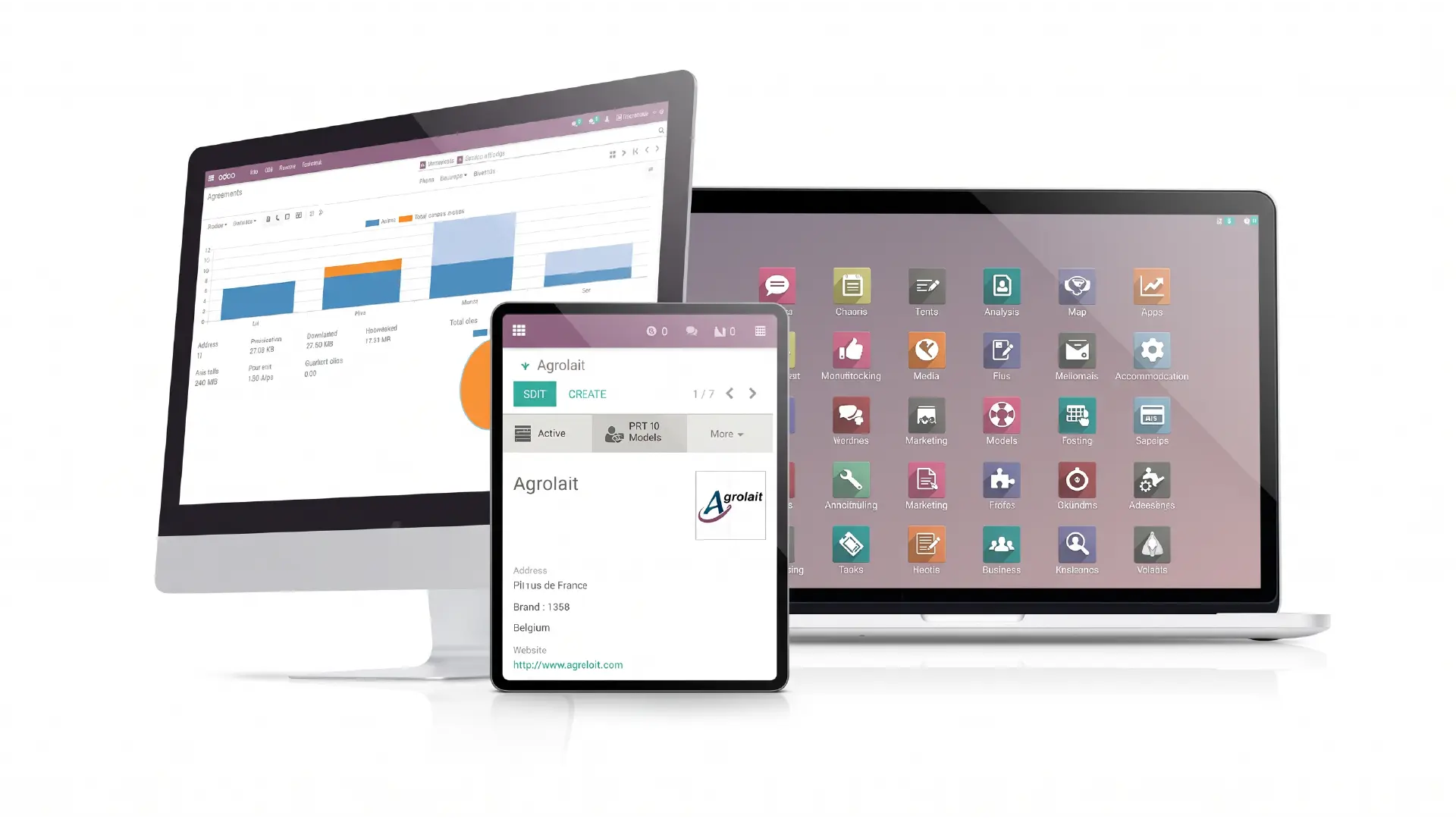
Odoo Inventory is an inventory and warehouse management application that helps businesses record, track, and control stock movements. It supports operations such as receiving goods, storing products, transferring stock between locations, fulfilling orders, and conducting inventory adjustments.
The module can be used by businesses managing a single storage location as well as those operating multiple warehouses. Its configuration can also support more detailed processes, including barcode scanning, lot and serial number tracking, and automated replenishment.
Rather than treating inventory as a standalone record, Odoo can connect stock operations with sales, purchasing, manufacturing, and accounting. This helps teams understand how product movements affect other business activities.
Key Features of the Odoo Inventory Module
The value of Odoo inventory management depends on how its features are configured around a company's actual warehouse and stock-handling processes.
1. Real-Time Stock Visibility
Odoo records inventory movements as products are received, transferred, reserved, or delivered. This helps teams view stock quantities and understand where products are located within the configured inventory structure.
For example, when a sales order reserves available products, the inventory team can use that information to plan fulfilment. This reduces dependence on manually updated spreadsheets and separate stock records.
Accurate visibility still depends on recording transactions correctly. Delayed receipts, unrecorded transfers, or incorrect adjustments can lead to discrepancies between system quantities and physical stock.
2. Multi-Warehouse and Storage Location Management
Businesses operating across several warehouses need to know not only how much stock they have but also where it is stored.
Odoo allows inventory to be organised using warehouses and internal storage locations. Depending on the operational requirements, businesses can configure locations for receiving, storage, picking, packing, and shipping.
This structure helps teams:
- Check stock availability by warehouse or location.
- Transfer products between warehouses.
- Organise picking and storage operations.
- Track movements between internal locations.
- Plan order fulfilment using available stock.
For businesses with several branches or distribution points, this creates a more consistent approach to inventory control.
3. Barcode Scanning for Inventory Operations
Manual data entry can slow down warehouse operations, particularly when teams handle high volumes of products or frequent stock movements.
Odoo's barcode functionality can support activities such as receiving products, picking orders, transferring stock, and performing inventory counts. Scanning compatible product or location barcodes can reduce repetitive typing and help employees record movements more consistently.
Before implementing barcode workflows, businesses should review their product identifiers, barcode labels, warehouse processes, and scanning equipment. Barcode scanning improves the recording process, but it does not automatically correct inaccurate product data or skipped transactions.
For a practical example of how structured inventory workflows can improve operations, explore our inventory management success story.
4. Lot and Serial Number Tracking
Some products require traceability beyond a simple quantity count. Businesses may need to identify a particular batch, individual unit, supplier receipt, or product movement.
Odoo supports lot and serial number tracking for products configured to use these identifiers.
- Lot tracking: Groups products under a shared batch or lot number.
- Serial number tracking: Identifies individual units using unique serial numbers.
These capabilities can help businesses trace products through receiving, internal movements, and delivery. They are particularly useful when managing products that require warranty tracking, batch identification, or a documented movement history.
The level of traceability depends on the tracking method selected and whether employees consistently record the relevant identifiers during stock operations.
5. Reordering Rules and Replenishment
Running out of essential products can delay customer orders, while excessive purchasing can tie up working capital and increase storage requirements.
Odoo supports replenishment workflows that help businesses identify products requiring additional stock. Reordering rules can be configured around minimum and maximum stock levels, with replenishment proposals based on the applicable settings and product requirements.
Depending on the configuration, replenishment can involve purchasing products from suppliers or producing them internally.
To use these features effectively, businesses should review supplier lead times, demand patterns, minimum order quantities, stock policies, and product availability. Poorly configured rules can still create unnecessary purchases or stock shortages.
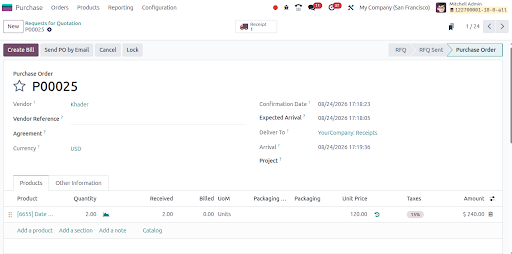
Odoo purchase order showing supplier details, ordered quantities, expected arrival dates, and product costs.
Odoo Inventory also connects with purchasing to help businesses manage incoming stock. Purchase orders record supplier details, ordered quantities, expected delivery dates, and product costs, giving teams better visibility into materials that have been ordered but not yet received.
6. Inventory Valuation and Costing
Inventory management affects more than warehouse operations. Stock values also influence financial reporting and the cost of goods held by a business.
Odoo supports inventory valuation configurations that can connect stock movements with accounting processes. Available costing methods include:
- Standard Cost: Uses a configured standard cost for the product.
- Average Cost (AVCO): Calculates cost using an average based on the applicable inventory transactions.
- First In, First Out (FIFO): Assigns costs based on the first-in, first-out costing principle.
The appropriate method depends on the business, its accounting policies, and the way it manages product costs. Inventory valuation settings should be reviewed carefully before implementation because they can affect financial records and reporting.
For businesses reviewing their wider financial workflows, our guide to Odoo Accounting features explains how accounting functionality can support connected financial operations.
7. Stock Transfers, Returns, and Inventory Adjustments
Inventory does not move only from suppliers to customers. Products may also be transferred between locations, returned by customers, sent back to suppliers, scrapped, or corrected during stock counts.
Odoo helps businesses record these different movements through configured inventory operations.
A structured process for transfers, returns, and adjustments makes it easier to understand why quantities changed and where products moved. It also helps teams investigate differences between expected and actual stock.
Businesses should establish clear approval and recording procedures for adjustments, damaged goods, returns, and scrapped products so that inventory records remain reliable.
8. Inventory Reporting and Operational Visibility
Inventory reports help teams assess stock availability, monitor product movements, review inventory valuation, and investigate operational issues.
Depending on the configuration and reporting needs, businesses can use inventory data to answer questions such as:
- Which products are available for fulfilment?
- Where is a particular product stored?
- Which items may need replenishment?
- What stock movements occurred during a period?
- Which products require further investigation because of discrepancies?
Useful reports depend on consistent transaction recording and accurate product information. Businesses should identify the operational decisions they need to make before deciding which reports and dashboards to prioritise.
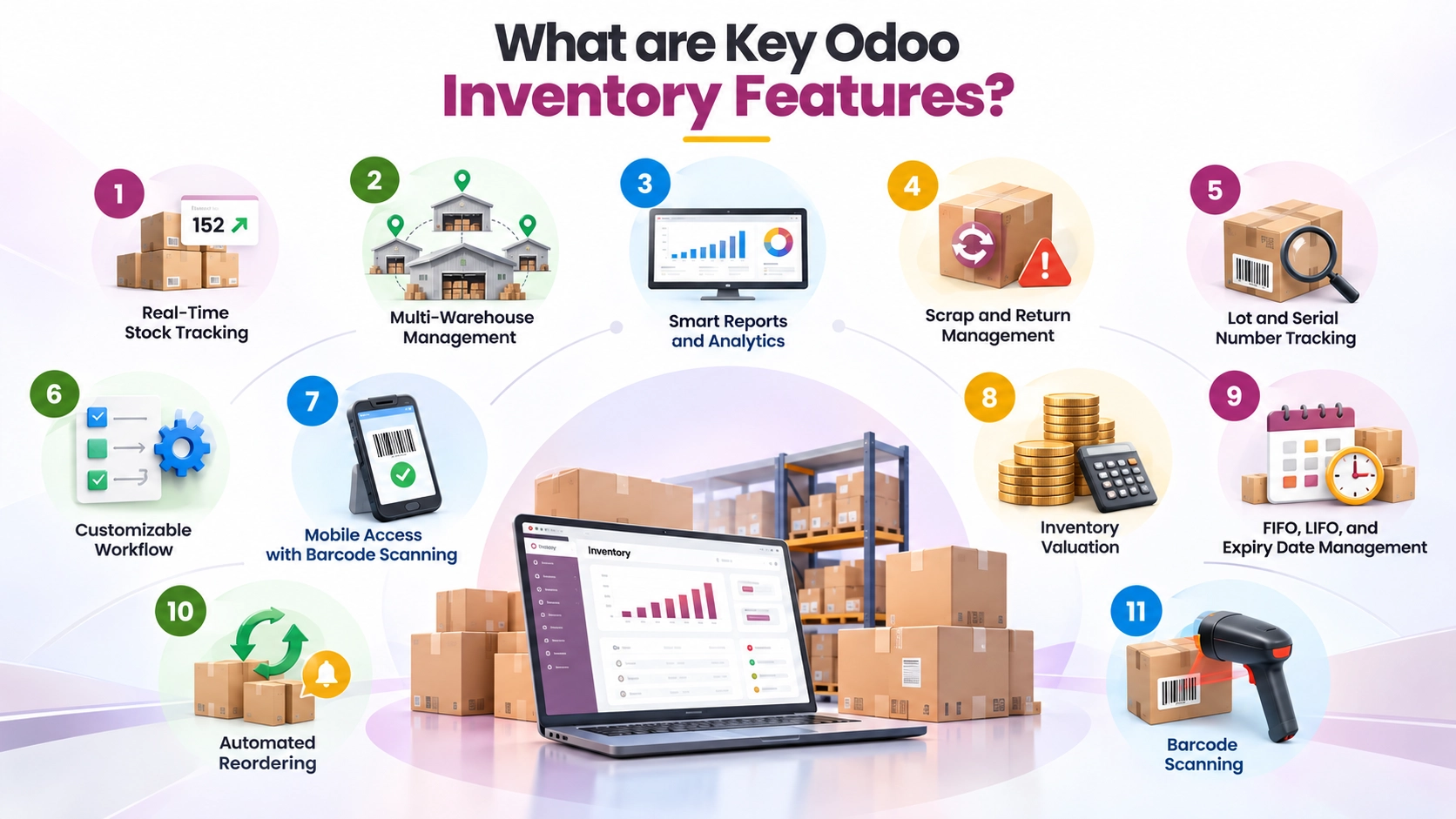
When configured around the way a business actually operates, Odoo inventory management can offer several practical benefits.
Better Stock Visibility
Teams can work from connected inventory records instead of maintaining multiple disconnected spreadsheets. This makes it easier to review stock quantities and locations before making fulfilment or purchasing decisions.
More Consistent Warehouse Operations
Standardised receiving, picking, transfers, and delivery workflows help employees follow a common process. Barcode functionality can further reduce repetitive data entry where suitable scanning processes are implemented.
Improved Replenishment Planning
Reordering rules and replenishment workflows help businesses identify potential stock shortages and plan purchases or production more systematically.
Stronger Product Traceability
Lot and serial number tracking can help businesses identify specific batches or individual products and review their movement history.
Connected Business Processes
When inventory is integrated with other relevant applications, stock movements can support sales fulfilment, purchasing decisions, manufacturing requirements, and financial records without relying entirely on separate systems.
More Informed Decisions
Reliable stock and movement data helps managers investigate inventory discrepancies, review product availability, and identify operational bottlenecks. The quality of these decisions depends on the accuracy of the underlying records.
How Odoo Inventory Integrates With Other Business Modules
Inventory operations are closely connected to other business activities. Odoo can link inventory with several applications, allowing information to flow between configured workflows.
Odoo application | How it connects with inventory |
Sales | Connects sales orders with product availability, stock reservations, picking, and delivery operations. |
Purchase | Supports supplier purchasing and the receipt of incoming products. |
Manufacturing (MRP) | Connects component availability and stock movements with production workflows. |
Accounting | Supports inventory valuation and related accounting entries, depending on the configuration. |
eCommerce | Connects online orders with inventory availability and fulfilment workflows. |
These integrations are most useful when businesses define clear processes across departments instead of treating each application as a separate tool.
For example, a manufacturing business may need purchasing to replenish raw materials, inventory to record component availability, and manufacturing to manage production orders. Our guide to Odoo Manufacturing and production planning explores how these processes can work together.
The exact workflow depends on the applications installed, the Odoo version, the business requirements, and the system configuration.
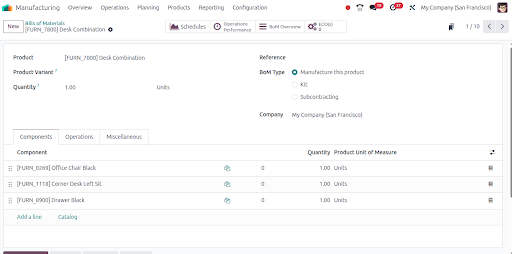
Odoo Bill of Materials listing the components whose stock levels are checked and reserved before production starts.
When a manufacturing order is confirmed, Odoo uses the Bill of Materials to check component availability in Inventory and reserve the required quantities. If stock is short, reordering rules can flag the shortfall. This keeps raw material stock, purchasing and production in one connected record.
Practical Example: Managing Inventory Across Two Warehouses
Consider a distributor operating two warehouses. Warehouse A receives products from suppliers, while Warehouse B fulfils orders for customers in another region.
Without a connected inventory process, employees may need to contact each other or check separate spreadsheets to confirm whether products are available. This can delay fulfilment and lead to unnecessary purchasing.
With Odoo inventory management, the business can establish a more structured workflow:
- Receive products: Record incoming products against the relevant receipt and warehouse.
- Store and organise stock: Assign products to configured internal locations.
- Check availability: Review stock quantities and reservations before confirming fulfilment plans.
- Transfer products: Record internal transfers when Warehouse B requires stock from Warehouse A.
- Fulfil customer orders: Use the configured picking and delivery workflow to process orders.
- Review stock records: Investigate discrepancies and use replenishment rules where appropriate.
This process improves visibility across the two locations. However, it relies on employees recording receipts, transfers, and deliveries correctly. Odoo can provide a connected view of inventory, but the business still needs clear procedures and accountability.
Is Odoo Inventory Suitable for Small Businesses?
Odoo inventory management can suit small businesses that need more structure than basic spreadsheets but do not necessarily require a complex warehouse management system.
It may be worth evaluating if a business needs to:
- Track stock across multiple storage locations.
- Connect inventory with sales and purchasing.
- Reduce repetitive stock data entry.
- Monitor replenishment requirements.
- Improve visibility into product movements.
- Build more consistent inventory processes as operations grow.
However, suitability depends on transaction volume, warehouse complexity, barcode requirements, reporting needs, integrations, and the team's ability to maintain accurate records.
A small business with simple stock requirements may need only a straightforward configuration. A business with multiple warehouses, detailed traceability, or complex fulfilment processes may require additional configuration, training, and workflow planning.
The best approach is to map the current inventory process, identify the main problems, and evaluate the required Odoo functionality before implementation.
Is Odoo Inventory Free?
The cost of using Odoo Inventory depends on the selected Odoo edition, hosting arrangement, applications required, and implementation approach.
Odoo provides different plans and deployment options. Businesses should check the current plan details to understand which applications and features are included and whether additional services are required.
It is also important to distinguish software subscription costs from implementation costs. Data migration, product setup, barcode configuration, integrations, user training, and custom workflows may add to the overall project cost.
Before selecting a plan, businesses should confirm the features they need, the number of users, the required applications, and the level of implementation support.
Frequently Asked Questions
1. Is Odoo good for inventory management?
Odoo can be a suitable inventory management solution for businesses that need stock tracking, warehouse management, replenishment, barcode operations, and integration with sales, purchasing, manufacturing, or accounting. Its suitability depends on how closely its capabilities match the business's inventory workflows.
2. Can Odoo manage inventory across multiple warehouses?
Yes. Odoo supports warehouse and internal location management. Businesses can configure stock transfers between warehouses and organise products by location, helping teams review availability and coordinate fulfilment across different sites.
3. What are the main features of the Odoo Inventory module?
Key capabilities include stock tracking, warehouse and location management, barcode operations, lot and serial number tracking, replenishment, inventory adjustments, stock transfers, and inventory valuation. Available functionality depends on the version, installed applications, and configuration.
4. Does Odoo Inventory support barcode scanning?
Yes. Odoo's barcode functionality can support inventory activities such as receiving products, picking orders, transferring stock, and conducting inventory counts. Businesses should verify hardware compatibility and configure product and location barcodes before using the workflow.
5. How does Odoo help prevent stockouts and overstocking?
Odoo supports replenishment workflows and configurable reordering rules that help businesses identify when products need additional stock. Results depend on accurate inventory records and suitable settings for demand, lead times, and purchasing requirements.
6. Can Odoo Inventory integrate with sales, purchasing, and accounting?
Yes. Odoo can connect inventory workflows with Sales, Purchase, and Accounting, as well as Manufacturing and eCommerce where the relevant applications are installed and configured. These connections help coordinate stock movements with orders, procurement, production, and financial processes.
7. What is the difference between a warehouse and an inventory location in Odoo?
A warehouse represents a broader stock-handling operation, while an internal location represents a specific place or stage within the warehouse structure. For example, a warehouse may contain receiving, storage, packing, and dispatch locations. This structure helps businesses organise inventory movements more precisely.
8. Does Odoo support lot and serial number tracking?
Yes. Odoo supports lot tracking for groups of products and serial number tracking for individually identified units. These features help businesses trace product movements when the relevant tracking options are configured and used consistently.
9. Which costing methods does Odoo support for inventory valuation?
Odoo supports Standard Cost, First In, First Out (FIFO), and Average Cost (AVCO) as inventory costing methods. The appropriate method depends on business requirements and accounting policies. Configuration should be reviewed carefully because inventory valuation affects financial records.
10. What should a business consider before implementing Odoo Inventory?
A business should review its warehouse structure, product data, stock transaction processes, barcode requirements, replenishment policies, traceability needs, inventory valuation method, integrations, and reporting requirements. Mapping these needs before implementation helps define the correct configuration and training plan.
Conclusion
Odoo inventory management helps businesses bring stock tracking, warehouse operations, replenishment, and related business workflows into a connected system. Features such as barcode scanning, lot and serial number tracking, inventory valuation, and multi-warehouse management can support more consistent operations when configured correctly.
The main priority is not simply to activate the Inventory module. It is to establish accurate product records, clear stock-handling procedures, and workflows that connect inventory with the rest of the business.
Executive Summary
- Improve visibility: Track stock quantities, locations, and movements through connected inventory records.
- Strengthen operations: Use warehouse management, barcode workflows, and replenishment rules to support consistent stock handling.
- Connect departments: Link inventory with sales, purchasing, manufacturing, and accounting where required.
Need Help Planning Your Odoo Inventory Workflow?
Choosing the right inventory configuration starts with understanding how your business receives, stores, transfers, and fulfils products. ERP Consulting Group can help you evaluate these workflows and identify the Odoo functionality needed to support your operations. Explore our Odoo implementation services to learn how your business can plan a suitable ERP implementation. For enquiries, contact info@erpconsulting24.com. |
Sources & References
The following official Odoo resources provide further information about inventory functionality and configuration:
- Odoo Inventory Management Documentation
- Odoo Replenishment Documentation
- Odoo Inventory Valuation Documentation
- Odoo Lot and Serial Number Tracking Documentation
- Odoo Pricing and Plans
 Recent Posts




 Free Consultation