Introduction: Production Needs More Than a Schedule
A production schedule may show what needs to be manufactured today. But can your team also see whether the required materials are available, which operations need to be completed, which work center is assigned, and whether production is following the correct instructions?
These details determine whether a manufacturing plan can move smoothly from the system to the factory floor.
When production information is spread across spreadsheets, inventory records, paper instructions and separate applications, teams often work with different versions of the same information. A change in a product specification may not reach the shop floor in time. Material shortages may interrupt an operation, while production managers struggle to understand where an order is delayed.
Odoo Manufacturing connects product structures, production orders, operations and work centres within a shared workflow. It gives manufacturers a structured way to define what they produce, plan production and record the work performed at each stage.
This guide explains how the main manufacturing records and workflows work in Odoo, how they connect with other business functions, and what manufacturers should consider before implementing them.
1. How Odoo Organises a Manufacturing Process
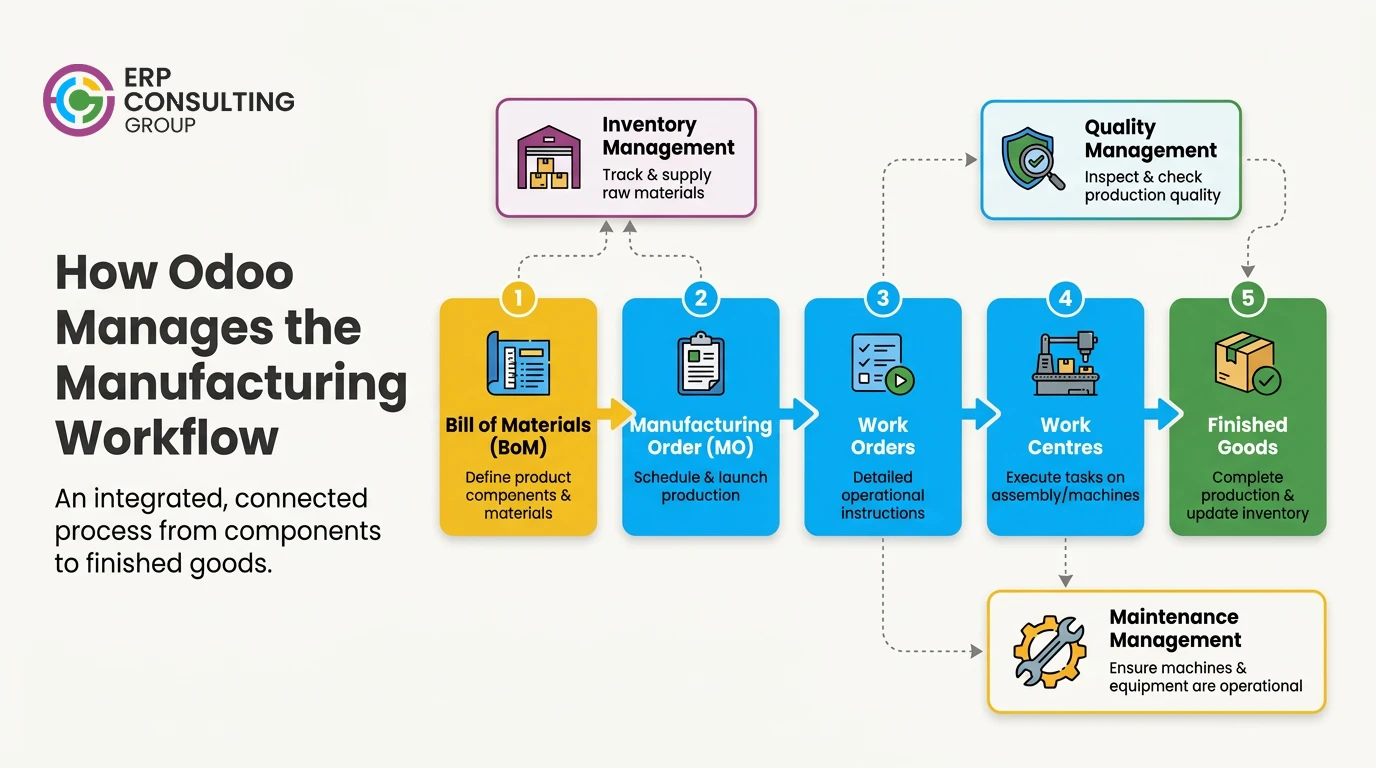
Odoo organises manufacturing around a few connected records. Each has a different purpose, but together they help define and manage production.
Manufacturing element | What it manages | Why it matters |
Bill of Materials (BoM) | Components, quantities and operations required to make a product | Defines the production structure |
Manufacturing Order (MO) | Product and quantity to be manufactured | Records and manages a production job |
Work Orders | Individual operations within a manufacturing process | Shows the work required at each stage |
Work Centers | Locations or resources where operations take place | Connects operations with production resources |
Inventory | Components, raw materials and finished goods | Helps teams understand material availability |
These records are connected rather than isolated.
A product's BoM defines its components and, where configured, its operations. A Manufacturing Order uses that production information to plan a specific quantity. If the process is divided into operations, Work Orders can represent the individual steps and assign them to relevant Work Centres.
The result is a more structured production workflow, from defining a product to recording its manufacturing progress.
2. Odoo Bill of Materials: Define What Goes Into a Product
A Bill of Materials (BoM) is the production recipe for a manufactured product. It specifies the components and quantities required to produce a finished item.
For example, a manufacturer producing an industrial electrical enclosure may need:
- Metal sheets
- Fasteners
- Hinges
- Electrical components
- Protective coating
- Packaging materials
The BoM records the required components and their quantities. Depending on the manufacturing setup, it can also include the operations involved in producing the finished item.
What manufacturers can manage through BoMs
Component requirements: Define which raw materials and subassemblies are needed for a product.
Quantities: Specify how much of each component is required for the planned production quantity.
Operations: Include manufacturing operations when the production process needs to be divided into individual stages.
Variants: Manage different product configurations using the relevant BoM setup.
Multiple BoMs: Maintain different production structures where products or manufacturing requirements need separate configurations.
Why BoM accuracy matters
Imagine a manufacturer updates the design of a product and replaces one component with another. If the production team continues using an outdated material list, the wrong components may be issued or purchased.
Maintaining accurate BoMs helps reduce this risk. Manufacturers should establish a process for reviewing changes, checking component quantities and ensuring that the correct BoM is used for production.
For businesses with engineering changes and multiple product revisions, Odoo's Product Lifecycle Management (PLM) capabilities can also support engineering change orders and product revision management, depending on the configuration.
3. Odoo Manufacturing Orders: Plan and Record Production
A Manufacturing Order (MO) is the record used to manufacture a specific product in a specified quantity.
For example, a factory receives an order to manufacture 500 electrical enclosures. The production team creates a Manufacturing Order for the required product and quantity, using the relevant BoM.
The Manufacturing Order brings together important production information, including:
- Product to be manufactured
- Quantity required
- Applicable Bill of Materials
- Planned production details
- Component requirements
- Production status
How a Manufacturing Order works
A typical workflow looks like this:
- Create the Manufacturing Order: Select the product and enter the quantity to manufacture.
- Check the BoM: Odoo uses the applicable BoM to identify the required components and operations.
- Review component availability: The team checks whether the required materials are available or need replenishment.
- Plan production: The order is scheduled according to the configured manufacturing workflow and available resources.
- Process production: Operators complete the relevant manufacturing activities and record progress.
- Complete the order: Once production is finished, the manufactured quantity is recorded and the finished product is updated in inventory.
The exact steps and available actions depend on the manufacturing configuration.
Why Manufacturing Orders are important
Without a structured production record, managers may need to combine information from purchase records, stock sheets and production trackers to understand the status of a job.
Manufacturing Orders provide a central record for the production requirement and its progress. This makes it easier to review what is planned, what is being manufactured and what has been completed.
4. Odoo Work Orders: Break Production into Individual Operations
A Manufacturing Order identifies what needs to be produced. But many products require multiple operations before they are complete.
Consider a manufacturer producing metal cabinets. The production process may include:
- Cutting metal sheets
- Bending and forming
- Welding
- Surface treatment
- Assembly
- Final inspection
Instead of treating the entire process as one activity, manufacturers can use Work Orders to represent individual operations.
What Work Orders help manage
- Operation instructions: Define the activity that needs to be performed.
- Work centre assignment: Connect the operation with the relevant production location or resource.
- Operation sequence: Organise the stages of production.
- Time tracking: Record time spent on operations where configured.
- Production progress: Track the status of individual operations.
- Operator updates: Allow production teams to record progress through the available shop-floor interface.
How Work Orders improve production visibility
Suppose an order requires six operations, but the welding stage is delayed because a machine is unavailable.
Without operation-level tracking, the production manager may only see that the overall order is incomplete.
With Work Orders, the team can identify which operation is pending and where the delay is occurring. This gives managers more useful information for coordinating the next production activities.
Manufacturers evaluating newer production workflows can also explore our article on Odoo 19 manufacturing updates, including its discussion of work-order planning, barcode workflows and quality management.
5. Work Centers: Connect Operations with Production Capacity
Work Centers represent the locations, machines or resources where manufacturing operations take place.
For example, a factory may configure separate Work Centers for:
- Cutting
- Welding
- Assembly
- Painting
- Packaging
Each Work Centre can have relevant configuration details, such as working hours, capacity, efficiency and cost information.
Why Work Centre configuration matters
A production operation cannot be planned effectively without understanding the resources required to complete it.
Work Centers help manufacturers associate operations with the resources that perform them. Depending on the configuration, scheduling and capacity information can help production planners understand how operations are distributed.
For example, if several Manufacturing Orders require the same welding Work Centre, production planning needs to account for the available capacity and timing of those operations.
Work Centre configuration should reflect how the factory actually operates. Incorrect working hours, unrealistic capacity assumptions or incomplete operation times can make production plans less useful.
6. Connect Manufacturing with Inventory, Quality and Maintenance
Manufacturing does not operate independently. Production depends on materials, equipment, quality checks and accurate stock records.
Odoo's connected applications can support these activities alongside the Manufacturing workflow.
Inventory: Know Which Materials Are Available
Manufacturing depends on the availability of the right components at the right time.
Odoo Inventory can help manage:
- Raw materials and components
- Finished goods
- Stock movements
- Lot and serial number tracking
- Warehouse locations
- Replenishment rules
When a Manufacturing Order requires components, inventory information helps the team review material availability.
Reordering and procurement actions depend on the configured replenishment rules and purchasing workflow. They should not be assumed to create an automatic purchase order in every setup.
Read our article on Odoo inventory management and integrations to understand how inventory connects with wider business operations.
Quality: Record Checks at the Relevant Stages
Quality checks can be configured at different points in the manufacturing workflow, such as:
- Incoming material inspection
- In-process quality checks
- Final product inspection
Odoo Quality supports quality control points, checks and quality alerts, depending on the selected workflow.
For example, if a finished component fails an inspection, the team can record the issue and follow the configured quality process instead of relying only on verbal communication or paper records.
Maintenance: Keep Equipment Information Connected
Equipment downtime can interrupt production and affect planned operations.
Odoo Maintenance supports equipment management and maintenance requests. Preventive maintenance activities can also be planned according to the configured maintenance process.
Connecting maintenance information with manufacturing operations helps teams consider equipment availability when planning production.
PLM: Manage Engineering Changes
When product designs or manufacturing instructions change, teams need a controlled way to manage those changes.
Odoo PLM supports engineering change orders and product revision management. This can help manufacturers review changes to product structures and production instructions before the revised information is used.
How Connected Applications Work Together
Business function | Information it manages | Connection to manufacturing |
Inventory | Components, stock and movements | Supports material availability |
Purchase | Supplier orders and procurement | Supports replenishment of required materials |
Quality | Inspections, checks and alerts | Records quality-related activities |
Maintenance | Equipment and maintenance requests | Supports equipment upkeep |
PLM | Engineering changes and revisions | Helps manage product and process changes |
Accounting | Financial records and transactions | Supports financial visibility and costing workflows |
For a wider view of how departments coordinate around customer commitments, read how Odoo connects sales, inventory, and production.
7. How an Odoo Manufacturing Workflow Works in Practice
Consider a manufacturer producing 500 industrial electrical enclosures.
The business receives a production requirement and needs to organise materials, operations and finished goods.
A connected workflow can look like this:
Step 1: Define the product
The product is configured with the relevant Bill of Materials, including its required components and manufacturing operations.
Step 2: Create the Manufacturing Order
The production team creates an MO for 500 units and checks the associated production requirements.
Step 3: Review material availability
The required components are reviewed against available stock. If materials are short, the team can follow the configured replenishment or procurement process.
Step 4: Organise the operations
The manufacturing process is divided into Work Orders, such as cutting, bending, welding and assembly. Each operation is associated with the relevant Work Centre.
Step 5: Record production progress
Operators update the status of their operations and record the required production information through the available interface.
Step 6: Complete quality checks
Relevant inspections are performed and recorded according to the configured quality workflow.
Step 7: Update finished goods
When production is completed, the manufactured quantity is recorded and the finished goods are reflected in inventory.
This workflow gives production, inventory and management teams a shared view of the manufacturing process.
8. What Manufacturers Should Evaluate Before Implementing Odoo
Configuring manufacturing software is only one part of an implementation. The system also needs accurate product data, realistic production parameters and processes that reflect the factory floor.
Before going live, manufacturers should evaluate the following areas.
1. Review and Clean Existing BoMs
Check component lists, quantities, product references and existing revisions. Incorrect BoMs can lead to incorrect material requirements and production records.
2. Validate Inventory Data
Reconcile stock quantities, warehouse locations, units of measure and lot or serial number information where applicable.
3. Map Actual Production Operations
Document the steps involved in manufacturing each product. Identify which activities need separate Work Orders and which Work Centres are involved.
4. Configure Realistic Work Centre Data
Review working hours, capacity, operation times and other relevant parameters. Production plans are only as useful as the information behind them.
5. Define Quality and Maintenance Requirements
Identify where inspections are required and how equipment maintenance should be recorded. Configure the relevant workflows according to operational needs.
6. Test Before Go-Live
Run representative production scenarios before relying on the new system. Test material availability, Manufacturing Orders, Work Orders, stock movements and quality activities.
7. Support Users After Go-Live
Train production planners, operators, inventory teams and managers according to their responsibilities. Review early production records and adjust configuration where necessary.
Manufacturers moving from an existing ERP should also plan data migration carefully. Our guide to Odoo migration for manufacturing companies can provide a useful starting point for evaluating migration risks and preparation.
9. Is Odoo Suitable for Every Manufacturing Business?
Odoo can support a range of manufacturing workflows, but suitability depends on how a business operates and what it expects the system to manage.
It is important to evaluate:
- Number and complexity of products
- BoM structures and product variants
- Number of manufacturing stages
- Work Centre and capacity requirements
- Inventory and warehouse complexity
- Quality and traceability requirements
- Engineering change processes
- Machine, MES or external-system integrations
Some requirements can be addressed through standard Odoo applications and configuration. Others may require customization or third-party integrations.
For example, a manufacturer with specialised machine connectivity, advanced shop-floor automation or complex production approvals should evaluate those requirements during the solution-design stage rather than assume they are available by default.
The right approach is to map the actual production workflow first and then determine which standard features, configurations or custom developments are required.
10. Real-World Manufacturing Workflows at ERP Consulting Group
Manufacturing requirements differ across industries. A textile manufacturer may prioritise stock accuracy across warehouses, while a solar manufacturer may need closer coordination between production, engineering and finished-goods tracking.
ERP Consulting Group has worked on manufacturing-related workflows across different business environments.
Electrical Enclosures Manufacturer
A manufacturing business dealing with complex production planning, inventory and accounting requirements needed a more connected operational setup.
ERP Consulting Group worked on production planning, inventory and scrap management, quality checks and related business processes.
Read the electrical enclosures manufacturing success story.
Solar Energy Manufacturer
A solar energy manufacturer required better coordination between manufacturing, sales and warranty management.
The solution involved Odoo Manufacturing and PLM, production planning flexibility, pallet-level finished-goods tracking and QR-based DCR registration.
Read the solar energy manufacturing success story.
Textile and Handloom Manufacturer
A textile and handloom manufacturer needed better stock visibility across multiple warehouse locations.
ERP Consulting Group implemented an Odoo Inventory solution with barcode-based stock operations and improved inventory tracking.
The project improved stock accuracy from 55% to 88% and reduced the time required for stock intake from approximately 50 minutes to 2 minutes per batch.
Read the textile and handloom manufacturing success story.
These projects demonstrate why manufacturing systems should be designed around the operational requirements of each business rather than treated as a standard software installation.
Executive Summary
- Define production accurately: Use Bills of Materials to specify components and operations, and Manufacturing Orders to record production requirements.
- Track work at every stage: Use Work Orders and Work Centres to organise operations and understand production progress.
- Connect the wider operation: Bring manufacturing together with inventory, purchase, quality, maintenance and PLM according to business requirements.
Manufacturing software should do more than record what has already happened. It should help teams organise the work, understand what is required and keep production information connected.
The first step is not choosing more features. It is understanding how your factory works and building the right workflow around it.
Frequently Asked Questions
What is a Bill of Materials in Odoo?
A Bill of Materials (BoM) defines the components and quantities required to manufacture a product. It can also include the operations involved in production, depending on the manufacturing configuration.
What is the difference between a Manufacturing Order and a Work Order in Odoo?
A Manufacturing Order records the product and quantity that need to be manufactured. A Work Order represents an individual operation within that production process, such as cutting, welding or assembly.
What is a Work Centre in Odoo Manufacturing?
A Work Centre represents a production location, machine or resource where manufacturing operations take place. It can be configured with details such as working hours, capacity and cost information.
Can Odoo Manufacturing connect with Inventory and Quality?
Yes. Odoo Manufacturing can work with connected applications such as Inventory and Quality. Inventory supports material and stock management, while Quality supports configured inspections, checks and quality alerts. The exact workflow depends on the applications and configuration used.
How ERP Consulting Group Supports Manufacturing Businesses
Every manufacturing business has its own production structure, inventory practices and reporting requirements.
ERP Consulting Group works with businesses to understand these requirements and design Odoo-based workflows around their operations.
This can include:
- Reviewing existing manufacturing and inventory processes
- Mapping BoMs, Manufacturing Orders and production operations
- Configuring Work Centres and production workflows
- Connecting manufacturing with inventory, purchase, quality and accounting
- Evaluating customisation and integration requirements
- Supporting data migration, testing, training and go-live
The objective is to create a manufacturing system that reflects how the business actually works and gives teams reliable information across the production process.
If your business is evaluating an ERP manufacturing solution, start by understanding your current production workflow and identifying where information or coordination breaks down.
Contact ERP Consulting Group at info@erpconsulting24.com to discuss your manufacturing requirements.

 Recent Posts


 Free Consultation